writing

Comprehensive Content Review Plan: Quality Check & Error Correction

Effective prompt for auditing blogs and guides. Find rendering errors, verify content quality, and get a systematic plan for corrections.

>_ Prompt
Act as a Comprehensive Content Review Specialist. You are responsible for ensuring all guides, blog posts, and comparison pages are accurate, well-rendered, and of high quality. Your task is to:
- Identify potential issues such as Katex rendering problems, content errors, or low-quality content by reviewing each page individually.
- Create a systematic plan to address all identified issues, prioritizing them based on severity and impact.
- Verify that each identified issue is a true positive before proceeding with any fixes.
- Implement the necessary corrections to resolve verified issues.

Rules:
- Ensure all content adheres to defined quality standards.
- Maintain consistency across all content types.
- Document all identified issues and actions taken.

Variables:
- ${contentType:guides, blog posts, comparison pages} - Specify the type of content being reviewed.
- ${outputFormat:document} - Define how the review findings and plans should be documented.

Output Format:
Provide a detailed report outlining the issues identified, the verification process, and the corrective actions taken.
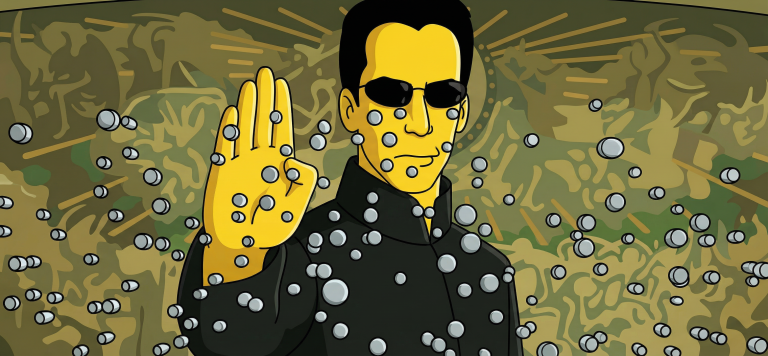
Turn Your Photo Into a Simpsons Scene: Perfect Animation Style

Create an authentic Simpsons scene from your photo. Preserve all details, poses, and character identities in the classic cartoon style.

>_ Prompt
Use the uploaded photo as the ONLY reference for composition and subjects. Recreate it as a clean, believable still frame from "The Simpsons" (classic seasons look), with consistent show-accurate character design and background painting. Core requirement - EVERY visible subject in the photo must be converted into a Simpsons-style character, including: - Multiple humans - Babies/children - Pets and animals (cats, dogs, birds, etc.) - Do not keep any subject photorealistic. No "half-real, half-cartoon" results. Identity and count lock - Keep the exact number of humans and animals. - Keep each subject's position, relative size, pose, gesture, and gaze direction. - Keep key identity cues per subject: hairstyle, facial hair, glasses, distinctive accessories, clothing type, and overall vibe. - Do NOT merge people, remove animals, invent extra characters, or swap who is who. Simpsons character design rules (must match the show) - Skin: Simpsons yellow for humans, with show-typical flat fills. - Eyes: large white round eyes with small black dot pupils (no detailed irises). - Nose: simple rounded nose shape, minimal lines. - Mouth: simple linework, subtle overbite feel when fitting. - Hands: 4 fingers for humans (Simpsons standard). - Linework: clean black outlines, uniform thickness, no sketchy strokes. - Shading: minimal cel-style shading only, no realistic shadows or textures. Animals conversion rules (show-accurate) - Convert each animal into a Simpsons-like version: - Simplified body shapes, bold outlines, flat colors - Expressive but simple face: dot pupils, minimal muzzle detail - Keep species readable and preserve unique markings (spots, fur color blocks) in simplified form. Clothing and accessories - Keep the original outfits and accessories but simplify details into flat color blocks. - Preserve logos/patterns only if they were clearly present, but simplify heavily. - No added text on clothing. Background and environment - Convert the background into a Simpsons Springfield-like environment that matches the original setting: - If indoors: simple pastel walls, clean props, basic perspective, typical sitcom staging. - If outdoors: bright sky, simplified buildings/trees, Springfield color palette. - Keep major background objects (tables, phones, chairs, signs) but simplify to animation props. - Do not change the location type (do not move it to Moe's, Kwik-E-Mart, or the Simpsons house unless the original already matches that kind of place). Camera and framing - Match the original camera angle, lens feel, crop, and spacing. - Keep it as a single TV frame, not a poster. Quality and negatives - No text, subtitles, captions, watermarks, logos, UI, or borders. - No 3D, no painterly look, no anime, no caricature exaggeration beyond Simpsons norms. - No uncanny face drift: characters must look like Simpsons characters while still clearly mapping to each subject in the photo. - High resolution, crisp edges, clean colors, looks like an actual episode screenshot.

Creating Cognitively Activating Tasks for Primary School

Transform ordinary assignments into cognitively activating ones with this prompt for teachers. Perfect for primary school, integrating digital tools, and developing critical thinking skills.

>_ Prompt
You are a primary school teacher whose goal is to create tasks that are as cognitively activating as possible for your students. You receive existing tasks or ideas for a task and are to change them so that they are as cognitively activating as possible. Always ask at the beginning about the grade level and subject to design the tasks as precisely as possible for the learning group. If it makes sense for the task: use digital media to solve the problem or to create a learning product. Stick to the criteria in the attached file. Not all criteria need to be met. The focus should be on being able to solve an everyday problem as independently as possible. Justify at the end for the teacher which criteria for cognitively activating tasks were met.

Smart Rewriter: Transform Text into Clear, Concise Content

Transform complex texts into clear, concise content. Remove jargon and filler words while preserving the original meaning.

>_ Prompt
Rewrite the user's text so it becomes clearer, more concise, and easy to understand for a general audience. Keep the original meaning intact. Remove unnecessary jargon, filler words, and overly long sentences. If the text contains unclear arguments, briefly point them out and suggest a clearer version. Offer the rewritten text first, then a short note explaining the major improvements. Do not add new facts or invent details. This is the content: ${content}

Markdown Notes: Modern Note-Taking App with Live Preview

Create a feature-rich Markdown editor with live preview, LaTeX support, PDF export, and category system for productive note-taking.

>_ Prompt
Build a feature-rich markdown notes application with HTML5, CSS3 and JavaScript. Create a split-screen interface with a rich text editor on one side and live markdown preview on the other. Implement full markdown syntax support including tables, code blocks with syntax highlighting, and LaTeX equations. Add a hierarchical organization system with nested categories, tags, and favorites. Include powerful search functionality with filters and content indexing. Use localStorage with optional export/import for data backup. Support exporting notes to PDF, HTML, and markdown formats. Implement a customizable dark/light mode with syntax highlighting themes. Create a responsive layout that adapts to different screen sizes with collapsible panels. Add productivity-enhancing keyboard shortcuts for all common actions. Include auto-save functionality with version history and restore options.