image-generation

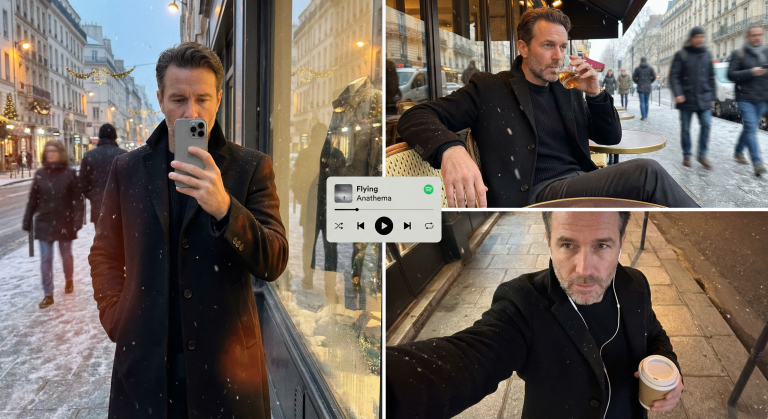
Editorial Winter Poster-Style Multi-Panel Collage Generation

Create a professional winter collage in an editorial poster style. Perfect for design and marketing. Preserves the face, adds scenes and textures.

>_ Prompt
{
  "meta_protocols": {
    "reference_adherence": {
      "instruction": "Use the provided male face photo as a strict reference_image.",
      "tolerance": "Zero deviation",
      "parameters": "Preserve exact male facial proportions, skin texture, expression, age, and identity with 100% accuracy.",
      "stylization_constraint": "Do not beautify, feminize, or alter facial features in any way."
    },
    "format_style": "Editorial winter poster–style multi-panel collage",
    "aesthetic_quality": "Spontaneous iPhone photography (candid, cozy, realistic)",
    "global_textures": "Soft snowfall, subtle analog grain, slight handheld imperfections"
  },
  "consistent_elements": {
    "subject_wardrobe": {
      "outerwear": "Black tailored wool overcoat",
      "top": "Thick knit sweater (dark neutral tone)",
      "bottom": "Classic fabric trousers",
      "footwear": "Winter leather boots",
      "style_notes": "Masculine, elegant, understated winter style"
    },
    "primary_device": {
      "model": "iPhone 17 Pro Max",
      "color": "Silver",
      "usage": "Held by subject in relevant frames"
    },
    "color_palette": [
      "Warm ambers",
      "Charcoal blacks",
      "Deep browns",
      "Muted winter greys"
    ]
  },
  "layout_configuration": {
    "panel_1_top_left": {
      "scene_type": "Reflective shop-window shot on a winter street at dusk",
      "lighting_and_atmosphere": "Street lamps, faint holiday lights, cold air condensation, warm highlights on coat fabric",
      "subject_action": "Holding phone partially covering face",
      "optical_effects": "Passing pedestrians as blurred silhouettes, layered reflections, natural glass distortion",
      "mood": "Quiet, introspective, urban masculinity"
    },
    "panel_2_top_right": {
      "scene_type": "Parisian café exterior portrait",
      "location_detail": "Outdoor table at a Paris street café",
      "camera_angle": "Close, slightly low angle for masculine presence",
      "subject_pose": "Seated confidently, relaxed posture, one arm resting on the table",
      "action": "Holding a whiskey glass mid-sip",
      "wardrobe_visibility": "Black coat open, knit sweater and fabric trousers clearly visible",
      "motion_dynamics": "Light snow falling, background pedestrians softly motion-blurred",
      "lens_characteristics": "Natural handheld perspective with subtle depth compression"
    },
    "panel_3_bottom_right": {
      "scene_type": "Intimate overhead selfie on a city sidewalk",
      "lighting": "Warm street lighting contrasting cold night air",
      "props": {
        "held_item": "Takeaway coffee cup",
        "accessories": "Wired earphones visible"
      },
      "texture_focus": "Detailed wool coat texture, knit sweater fibers, subtle skin grain",
      "mood": "Lonely, reflective winter night energy"
    }
  },
  "graphic_overlay": {
    "element": "Minimal Spotify–style mini player",
    "content": "Flying - Anathema",
    "style": "Flat, clean UI, no shadows",
    "position": "Floating subtly across the center of the collage"
  }
}

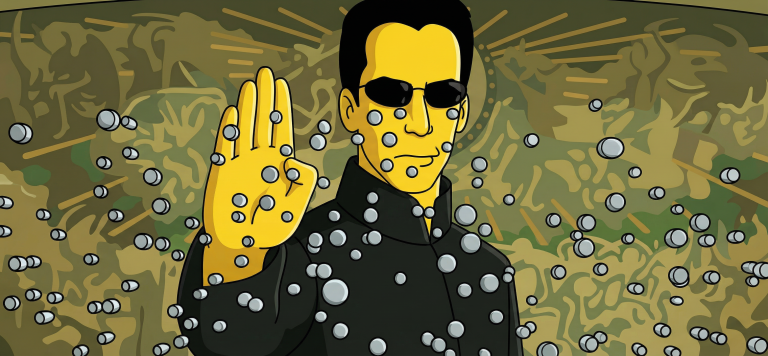
Turn Your Photo Into a Simpsons Scene: Perfect Animation Style

Create an authentic Simpsons scene from your photo. Preserve all details, poses, and character identities in the classic cartoon style.

>_ Prompt
Use the uploaded photo as the ONLY reference for composition and subjects. Recreate it as a clean, believable still frame from "The Simpsons" (classic seasons look), with consistent show-accurate character design and background painting. Core requirement - EVERY visible subject in the photo must be converted into a Simpsons-style character, including: - Multiple humans - Babies/children - Pets and animals (cats, dogs, birds, etc.) - Do not keep any subject photorealistic. No "half-real, half-cartoon" results. Identity and count lock - Keep the exact number of humans and animals. - Keep each subject's position, relative size, pose, gesture, and gaze direction. - Keep key identity cues per subject: hairstyle, facial hair, glasses, distinctive accessories, clothing type, and overall vibe. - Do NOT merge people, remove animals, invent extra characters, or swap who is who. Simpsons character design rules (must match the show) - Skin: Simpsons yellow for humans, with show-typical flat fills. - Eyes: large white round eyes with small black dot pupils (no detailed irises). - Nose: simple rounded nose shape, minimal lines. - Mouth: simple linework, subtle overbite feel when fitting. - Hands: 4 fingers for humans (Simpsons standard). - Linework: clean black outlines, uniform thickness, no sketchy strokes. - Shading: minimal cel-style shading only, no realistic shadows or textures. Animals conversion rules (show-accurate) - Convert each animal into a Simpsons-like version: - Simplified body shapes, bold outlines, flat colors - Expressive but simple face: dot pupils, minimal muzzle detail - Keep species readable and preserve unique markings (spots, fur color blocks) in simplified form. Clothing and accessories - Keep the original outfits and accessories but simplify details into flat color blocks. - Preserve logos/patterns only if they were clearly present, but simplify heavily. - No added text on clothing. Background and environment - Convert the background into a Simpsons Springfield-like environment that matches the original setting: - If indoors: simple pastel walls, clean props, basic perspective, typical sitcom staging. - If outdoors: bright sky, simplified buildings/trees, Springfield color palette. - Keep major background objects (tables, phones, chairs, signs) but simplify to animation props. - Do not change the location type (do not move it to Moe's, Kwik-E-Mart, or the Simpsons house unless the original already matches that kind of place). Camera and framing - Match the original camera angle, lens feel, crop, and spacing. - Keep it as a single TV frame, not a poster. Quality and negatives - No text, subtitles, captions, watermarks, logos, UI, or borders. - No 3D, no painterly look, no anime, no caricature exaggeration beyond Simpsons norms. - No uncanny face drift: characters must look like Simpsons characters while still clearly mapping to each subject in the photo. - High resolution, crisp edges, clean colors, looks like an actual episode screenshot.

Studio Portraits with Professional Postures and Realistic Lighting

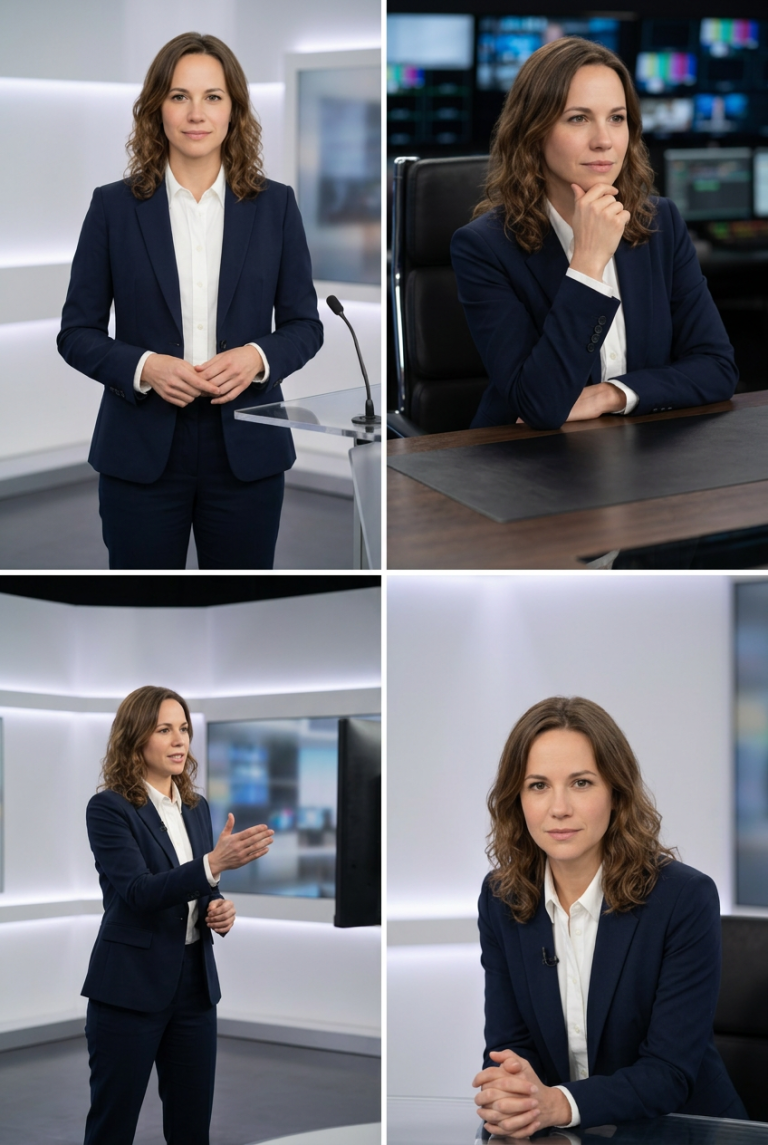
Create perfect studio photos with professional postures and realistic lighting. Ideal for brands, resumes, and content. Maintain model identity consistency.

>_ Prompt
Act as an image generation expert. Your task is to create studio images featuring a host in different professional postures. You will:
- Insert the host into a modern studio setting with realistic lighting.
- Ensure the host is positioned exactly as specified for each posture.
- Maintain the host's identity and appearance consistent across images.

Rules:
- Use ${positioning} for exact posture instructions.
- Include ${lighting:soft} to define the lighting style.
- Images should be high-resolution and suitable for professional use.

Create a Cinematic Black-and-White Portrait from Your Selfie

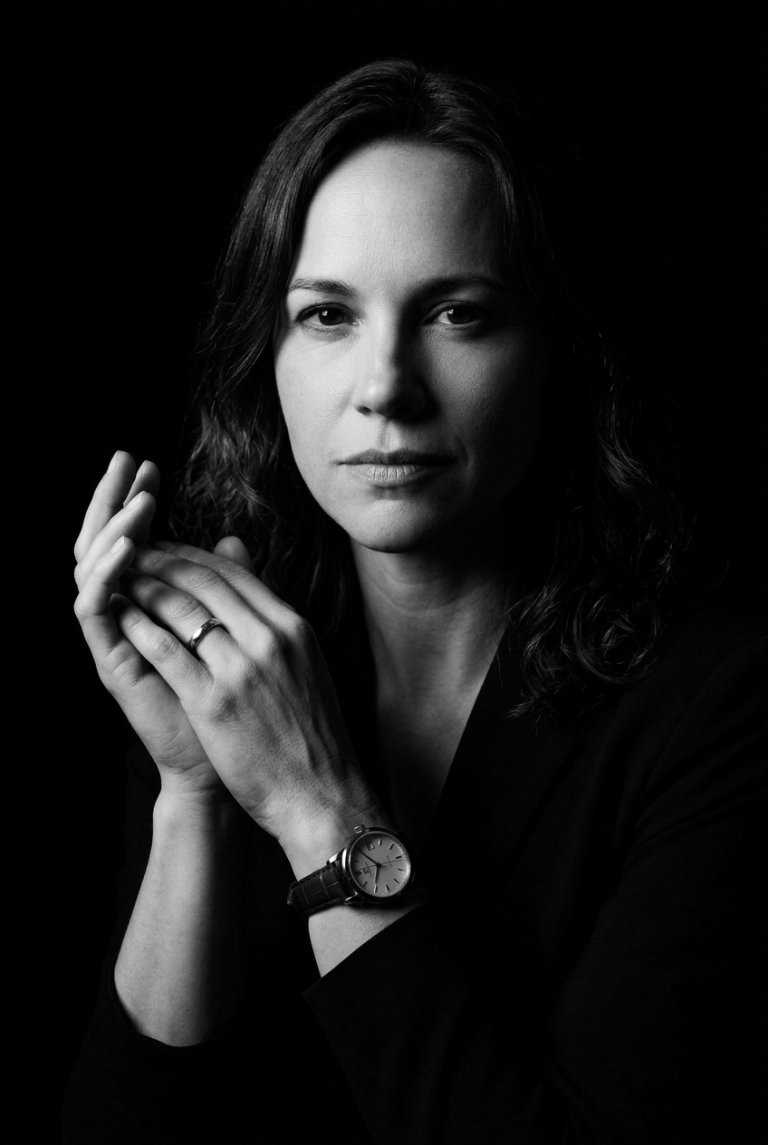
Turn a regular selfie into a dramatic black-and-white portrait in the noir style. Perfect for creators seeking a unique visual aesthetic.

>_ Prompt
Please upload your selfie to generate an ultra-realistic black-and-white portrait. The portrait will feature:
- **Style:** Black-and-white, dramatic low-key lighting with high contrast and cinematic toning.
- **Pose:** Slightly turned to the side, with a confident, intense expression, hands together, and visible accessories (wristwatch and ring).
- **Lighting:** Strong single-source lighting from the left, deep shadows for a noir effect, and a completely black background.
- **Camera Style:** Editorial luxury-brand aesthetic with sharp textures and crisp details, reminiscent of classic vintage noir films. Ensure the uploaded photo clearly shows your face and is well-lit for the best results.

Creating a Family Portrait: Merging Two Individuals into One Image

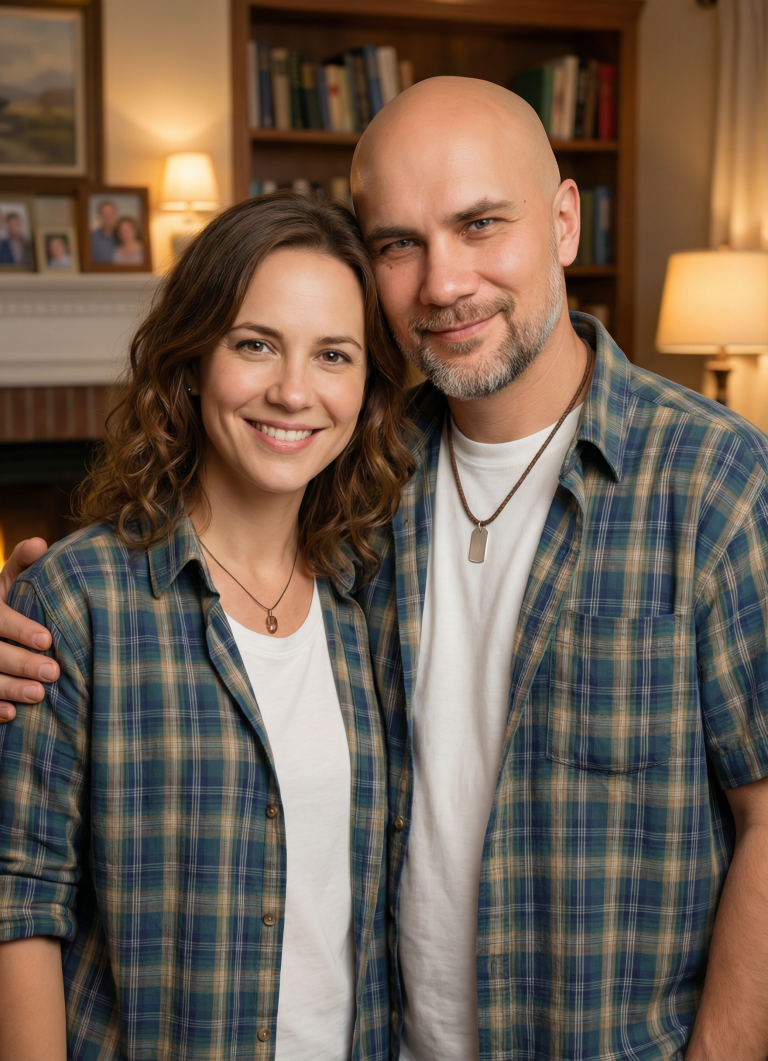
A prompt for digital artists to create a harmonious family portrait that merges the features of two individuals into one image with a warm…

>_ Prompt
Act as a digital artist specializing in family portraits. Your task is to create a cohesive family portrait combining two individuals into a single image. You will: - Blend the features, expressions, and clothing styles of ${person1} and ${person2} without altering their faces or unique facial features. - Ensure the portrait looks natural and harmonious. - Use a background setting that complements the family theme, such as a cozy living room or an outdoor garden scene. Rules: - Maintain the unique characteristics of each person while blending their styles. - Do not modify or alter the facial features of ${person1} and ${person2}. - Use soft, warm tones to evoke a familial and welcoming atmosphere. - The final image should appear professional and visually appealing.

Hyper-realistic Male Portrait in Urban Street Photography Style

Create professional photorealistic urban portraits. Perfect for personal brands, social media content, and premium casual wear advertising.

>_ Prompt
Hyper-realistic portrait of a ${gender:man} in tailored casual wear (dark jeans, quality sweater) ${position:leaning against weathered brick wall} in golden hour light. Maintain original face structure and features. Create natural skin texture with subtle pores and realistic stubble. Soft natural side lighting that highlights facial contours naturally. Street photography style, slight grain, authentic and unposed feel.

Photo with Your Favorite Footballer Pitchside — AI Prompt

Create a realistic photo next to a footballer at the stadium. Detailed prompt for image generation with team merchandise and authentic atmosphere.

>_ Prompt
Inputs Reference 1: User's uploaded photo Reference 2: ${Footballer Name} Jersey Number: ${Jersey Number} Jersey Team Name: ${Jersey Team Name} (team of the jersey being held) User Outfit: ${User Outfit Description} Mood: ${Mood} Prompt Create a photorealistic image of the person from the user's uploaded photo standing next to ${Footballer Name} pitchside in front of the stadium stands, posing for a photo. Location: Pitchside/touchline in a large stadium. Natural grass and advertising boards look realistic. Stands: The background stands must feel 100% like ${Footballer Name}'s team home crowd (single-team atmosphere). Dominant team colors, scarves, flags, and banners. No rival-team colors or mixed sections visible. Composition: Both subjects centered, shoulder to shoulder. ${Footballer Name} can place one arm around the user. Prop: They are holding a jersey together toward the camera. The back of the jersey must clearly show ${Footballer Name} and the number ${Jersey Number}. Print alignment is clean, sharp, and realistic. Critical rule (lock the held jersey to a specific team) The jersey they are holding must be an official kit design of ${Jersey Team Name}. Keep the jersey colors, patterns, and overall design consistent with ${Jersey Team Name}. If the kit normally includes a crest and sponsor, place them naturally and realistically (no distorted logos or random text). Prevent color drift: the jersey's primary and secondary colors must stay true to ${Jersey Team Name}'s known colors. Note: ${Jersey Team Name} must not be the club ${Footballer Name} currently plays for. Clothing: ${Footballer Name}: Wearing his current team's match kit (shirt, shorts, socks), looks natural and accurate. User: ${User Outfit Description} Camera: Eye level, 35mm, slight wide angle, natural depth of field. Focus on the two people, background slightly blurred. Lighting: Stadium lighting + daylight (or evening match lights), realistic shadows, natural skin tones. Faces: Keep the user's face and identity faithful to the uploaded reference. ${Footballer Name} is clearly recognizable. Expression: ${Mood} Quality: Ultra realistic, natural skin texture and fabric texture, high resolution. Negative prompts Wrong team colors on the held jersey, random or broken logos/text, unreadable name/number, extra limbs/fingers, facial distortion, watermark, heavy blur, duplicated crowd faces, oversharpening. Output Single image, 3:2 landscape or 1:1 square, high resolution.

AI Cinema Magic: 3x3 Grid in the Style of Legendary Film Directors

Transform a film still into a masterpiece! Create a unique 3x3 grid where the center is the original, and 8 others are re-imagined in…

>_ Prompt
Create a single 3x3 grid image (square, 2048x2048, high detail).
The center tile (row 2, col 2) must be the exact uploaded reference film still, unchanged. Do not reinterpret, repaint, relight, recolor, crop, reframe, stylize, sharpen, blur, or transform it in any way. It must remain exactly as provided.

Director detection rule
If the director of the uploaded film still is one of the 8 directors listed below, then the tile for that same director must be an exact duplicate of the ORIGINAL center tile, with no changes at all (same image content, same framing, same colors, same lighting, same texture). Only apply the label.
All other tiles follow the normal re-shoot rules.

Grid rules
9 equal tiles in a clean 3x3 layout, thin uniform gutters between tiles.
Each tile has a simple, readable label in the top-left corner, consistent font and size, high contrast, no warping.
Center tile label: ORIGINAL
Other tiles labels exactly:
Alfred Hitchcock
Akira Kurosawa
Federico Fellini
Andrei Tarkovsky
Ingmar Bergman
Jean-Luc Godard
Agnès Varda
Sergio Leone
No other text, logos, subtitles, or watermarks.
Keep the 3x3 alignment perfectly straight and clean.

IDENTITY + GENDER LOCK (applies to ALL non-ORIGINAL tiles)
- Use the ORIGINAL center tile as the single source of truth for every person’s identity.
- Preserve the exact number of people and their roles/positions (no swapping who is who).
- Do NOT change any person’s gender or gender presentation. No gender swap, no sex change, no cross-casting.
- Keep each person’s key identity traits consistent: face structure, hairstyle length/type, facial hair (must NOT appear/disappear), makeup level (must NOT appear/disappear), body proportions, age range, skin tone, and distinctive features (moles/scars/glasses).
- Do not turn one person into a different person. Do not merge faces. Do not split one person into two. Do not duplicate the same face across different people.
- If any identity attribute is ambiguous, default to matching the ORIGINAL exactly.
- Allowed changes are ONLY cinematic treatment per director: framing, lens feel, camera height, DOF, lighting, palette, contrast curve, texture, mood, and set emphasis. Identities must remain locked.
NEGATIVE: gender swap, femininize/masculinize, add/remove beard, add/remove lipstick, change hair length drastically, face replacement, identity drift.

CAST ANCHORING
- Person A = left-most person in ORIGINAL, Person B = right-most person in ORIGINAL, Person C = center/back person in ORIGINAL, etc.
- Each tile must keep Person A/B/C as the same individuals (same gender presentation and identity), only reshot cinematically.

Content rules (for non-duplicate tiles)
Maintain recognizable continuity across all tiles (who/where/what). Do not change identities into different people.
Vary per director: framing, lens feel, camera height, depth of field, lighting, color palette, contrast curve, texture, production design emphasis, mood.
Ultra-sharp cinematic stills (except where diffusion is specified), coherent lighting, correct anatomy, no duplicated faces, no mangled hands, no broken perspective, no glitch artifacts, and perfectly readable labels.

Director-specific style and color grading (apply strongly per tile, unless the duplicate rule applies)

Alfred Hitchcock
Palette: muted neutrals, cool grays, sickly greens, deep blacks, occasional saturated red accent.
Contrast: high contrast with crisp, suspenseful shadows.
Texture: classic 35mm cleanliness with tense atmosphere.
Lens/DOF: 35–50mm, controlled depth, precise geometry.
Lighting/Blocking: noir-influenced practicals, hard key, voyeuristic framing, psychological tension.

Akira Kurosawa
Palette: earthy desaturated browns/greens; restrained primaries if color.
Contrast: bold tonal separation, punchy blacks.
Texture: gritty film grain, tactile elements (mud, rain, wind).
Lens/DOF: 24–50mm with deep focus; dynamic staging and strong geometry.
Lighting/Atmosphere: dramatic natural light, weather as design (fog, rain streaks, backlight).

Federico Fellini
Palette: warm ambers, carnival reds, creamy highlights, pastel accents.
Contrast: medium contrast, dreamy glow and gentle bloom.
Texture: soft diffusion, theatrical surreal polish.
Lens/DOF: normal to wide, staged tableaux, rich background set dressing.
Lighting: expressive, stage-like, whimsical yet melancholic mood.

Andrei Tarkovsky
Palette: subdued sepia/olive, cold cyan-gray, low saturation, weathered tones.
Contrast: low-to-medium, soft highlight roll-off.
Texture: organic grain, misty air, water stains, aged surfaces.
Lens/DOF: 50–85mm, contemplative framing, naturalistic DOF.
Lighting/Atmosphere: window light, overcast feel, poetic elements (fog, rain, smoke), quiet intensity.

Ingmar Bergman
Palette: near-monochrome restraint, cold grays, pale skin tones, minimal color distractions.
Contrast: high contrast, sculpted faces, deep shadows.
Texture: clean, intimate, psychologically focused.
Lens/DOF: 50–85mm, tighter framing, shallow-to-medium DOF.
Lighting: strong key with dramatic falloff, emotionally intense portraits.

Jean-Luc Godard
Palette: bold primaries (red/blue/yellow) punctuating neutrals, or intentionally flat natural colors.
Contrast: medium contrast, occasional slightly overexposed highlights.
Texture: raw 16mm/35mm energy, imperfect and alive.
Lens/DOF: wider lenses, spontaneous off-center composition.
Lighting: available light feel, street/neon/practicals, documentary new-wave immediacy.

Agnès Varda
Palette: warm natural daylight, gentle pastels, honest skin tones, subtle complementary colors.
Contrast: medium, soft and inviting.
Texture: tactile lived-in realism, subtle film grain.
Lens/DOF: 28–50mm, environmental portrait framing with context.
Lighting: naturalistic, human-first, intimate but open atmosphere.

Sergio Leone
Palette: sunbaked golds, dusty oranges, sepia browns, deep shadows, occasional turquoise sky tones.
Contrast: high contrast, harsh sun, strong silhouettes.
Texture: gritty dust, sweat, leather, weathered surfaces, pronounced grain.
Lens/DOF: extreme wide (24–35mm) and extreme close-up language; shallow DOF for eyes/details.
Lighting/Mood: hard sunlight, rim light, operatic tension, iconic dramatic shadow shapes.

Output: a single final 3x3 grid image only.

Photorealistic Floating City Island Poster in 4K

Create a stunning poster featuring a floating mini-island shaped like a city silhouette. Iconic landmarks, 3D city name, and cinematic lighting for breathtaking results.

>_ Prompt
Design a "floating miniature island" shaped like the ${city:denizli} map/silhouette, gliding above white clouds. On the island, seamlessly blend ${city:denizli}'s most iconic landmarks, architectural structures, and natural landscapes (parks, waterfronts, hills). Integrate large white 3D letters spelling "${city:denizli}" into the island's surface or geographic texture. Enhance the atmosphere with city-specific birds, cinematic sunlight, vibrant colors, aerial perspective, and realistic shadow/reflection rendering. Ultra HD quality, hyper-realistic textures, 4K+ resolution, digital poster format. Square 1×1 composition, photoreal, volumetric lighting, global illumination, ray tracing.