design

PDF Viewer with JavaScript: Web-Based Document Viewer

Build a functional PDF viewer with navigation, search, annotations, and responsive design for all devices.

>_ Prompt
Create a web-based PDF viewer using HTML5, CSS3, JavaScript and PDF.js. Build a clean interface with intuitive navigation controls. Implement page navigation with thumbnails and outline view. Add text search with result highlighting. Include zoom and fit-to-width/height controls. Implement text selection and copying. Add annotation tools including highlights, notes, and drawing. Support document rotation and presentation mode. Include print functionality with options. Create a responsive design that works on all devices. Add document properties and metadata display.

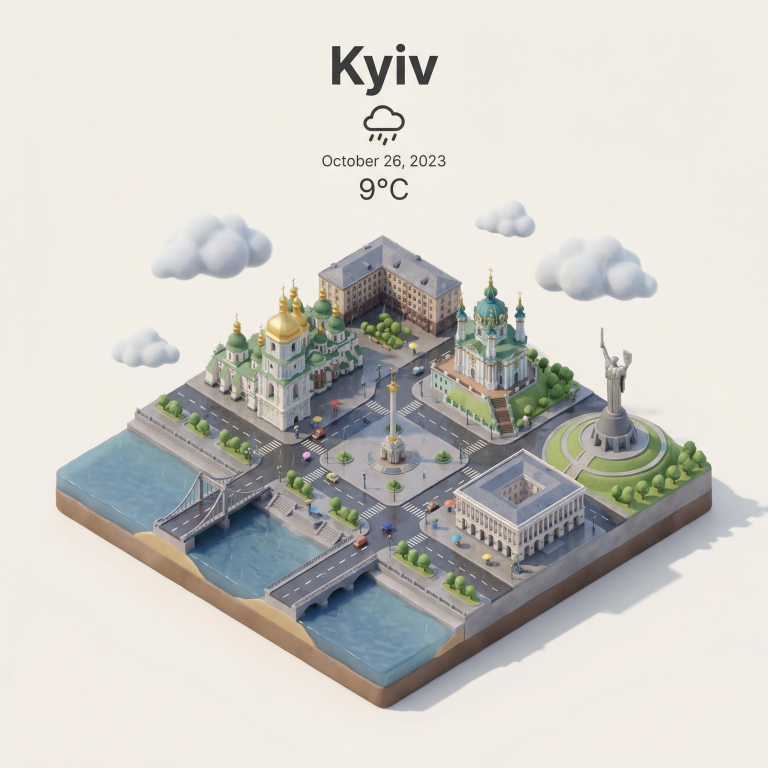
Whimsical Clay City: Miniature World Generation

Midjourney prompt: generate a whimsical miniature world with colorful clay featuring your landmark and city name in a playful style with vibrant colors.

>_ Prompt
Generate a whimsical miniature world featuring ${landmark_name} crafted entirely from colorful modeling clay. Every element (buildings, trees, waterways, and urban features) should appear hand-sculpted with visible fingerprints and organic clay textures. Use a playful, childlike style with vibrant colors: bright azure sky, puffy cream clouds, emerald trees, and buildings in warm yellows, oranges, reds, and blues. The handmade quality should be evident in every surface and gentle curve. Capture from a wide perspective showcasing the entire miniature landscape in a harmonious, joyful composition. At the top-center, add the city name ${city_name} in a clean, bold, friendly rounded font that matches the playful clay aesthetic. The text should be clearly readable and high-contrast against the sky, with subtle depth as if it is also made from clay (slight 3D clay lettering), but keep it simple and not overly detailed. Include no other text, words, or signage anywhere else in the scene. Only sculptural clay elements should define the location through recognizable architectural features. 1080x1080 dimension.

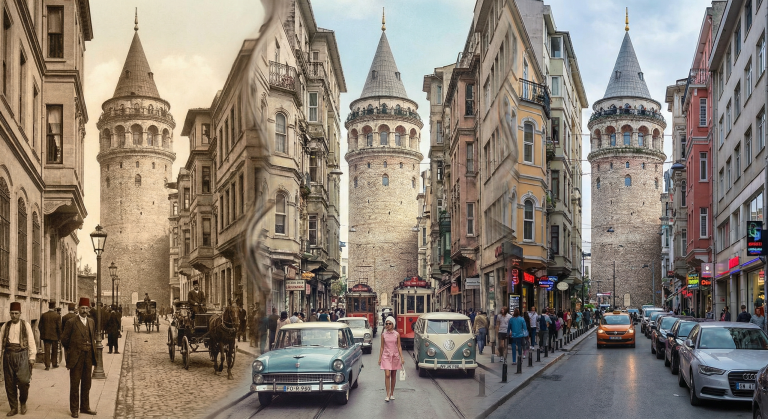
Time Layer Photography: Create Unique Multi-Era Historical Images

AI prompt for generating photos that combine different eras in one frame. From 19th-century sepia to modern digital clarity in a seamless transition.

>_ Prompt
A single photograph of ${location:Galata Tower, Istanbul} where the frame is divided into organic, flowing sections, each showing a different era: ${era1:1890s sepia Ottoman period}, ${era2:1960s faded color}, ${era3:present day digital clarity}. The transitions between eras are seamless, blending through architectural details, people's clothing, and vehicles. Same camera angle, same perspective, different times bleeding into each other. Street level view. Photorealistic for each era's authentic photography style.

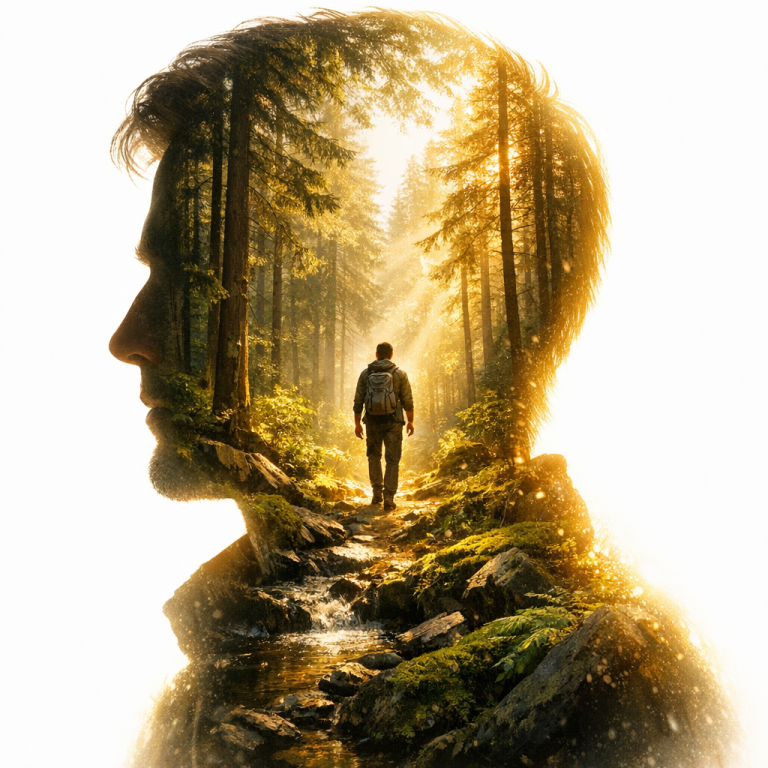
Double Exposure Portrait Prompt: Forest Magic & Depth

Create stunning artistic double exposure portraits with this prompt. Perfect for photographers, designers, and AI artists seeking cinematic high-contrast visuals.

>_ Prompt
A double exposure portrait set in a ${name:sunny forest}. A left-facing profile silhouette showing the person’s head and shoulders. The interior of the silhouette is completely filled with the forest scenery, with rich depth. Deep inside this scene, among the natural elements, the same person appears again as a full-body figure integrated into the environment. The outer background is a bright, overexposed white light. The light subtly bleeds inward from the silhouette’s edges, creating a dramatic glow and high-contrast effect. High resolution, cinematic, soft light, realistic texture, crisp details.

Pro Color Tool: Palettes, Gradients, WCAG, and CSS Code

Build a professional web tool for color work. Generate palettes and gradients, convert formats, check WCAG accessibility, and get ready-to-use CSS/SCSS/SVG code snippets.

>_ Prompt
Build a professional-grade color tool with HTML5, CSS3 and JavaScript for designers and developers. Create an intuitive interface with multiple selection methods including eyedropper, color wheel, sliders, and input fields. Implement real-time conversion between color formats (RGB, RGBA, HSL, HSLA, HEX, CMYK) with copy functionality. Add a color palette generator with options for complementary, analogous, triadic, tetradic, and monochromatic schemes. Include a favorites system with named collections and export options. Implement color harmony rules visualization with interactive adjustment. Create a gradient generator supporting linear, radial, and conic gradients with multiple color stops. Add an accessibility checker for WCAG compliance with contrast ratios and colorblindness simulation. Implement one-click copy for CSS, SCSS, and SVG code snippets. Include a color naming algorithm to suggest names for selected colors. Support exporting palettes to various formats (Adobe ASE, JSON, CSS variables, SCSS).

Interactive Weather Dashboard with OpenWeatherMap API

Build a stylish weather dashboard with 5-day forecast, geolocation, and responsive interface for all devices.

>_ Prompt
Build a comprehensive weather dashboard using HTML5, CSS3, JavaScript and the OpenWeatherMap API. Create a visually appealing interface showing current weather conditions with appropriate icons and background changes based on weather/time of day. Display a detailed 5-day forecast with expandable hourly breakdown for each day. Implement location search with autocomplete and history, supporting both city names and coordinates. Add geolocation support to automatically detect user's location. Include toggles for temperature units (°C/°F) and time formats. Display severe weather alerts with priority highlighting. Show detailed meteorological data including wind speed/direction, humidity, pressure, UV index, and air quality when available. Include sunrise/sunset times with visual indicators. Create a fully responsive layout using CSS Grid that adapts to all device sizes with appropriate information density.

Interactive Drawing Application with HTML5 Canvas and JavaScript

Create a full-featured drawing app with tools, layers, undo/redo, and export to PNG, JPG, SVG. Perfect code template for developers.

>_ Prompt
Create an interactive drawing application using HTML5 Canvas, CSS3, and JavaScript. Build a clean interface with intuitive tool selection. Implement multiple drawing tools including brush, pencil, shapes, text, and eraser. Add color selection with recent colors, color picker, and palettes. Include layer support with opacity and blend mode options. Implement undo/redo functionality with history states. Add image import and export in multiple formats (PNG, JPG, SVG). Support canvas resizing and rotation. Implement zoom and pan navigation. Add selection tools with move, resize, and transform capabilities. Include keyboard shortcuts for common actions.

Professional Exploded View Prompt for Technical 3D CAD Renders

Generate ultra-detailed exploded technical infographics and photorealistic 3D CAD renders for industrial design presentations and documentation.

>_ Prompt
{
  "name": "My Workflow",
  "steps": []
}{
  "promptDetails": {
    "description": "Ultra-detailed exploded technical infographic of {OBJECT_NAME}, shown in a 3/4 front isometric view. The object is partially transparent and opened, with its key internal and external components separated and floating around the main body in a clean exploded-view layout. Show all major parts typical for {OBJECT_NAME}: outer shell/panels, structural frame, primary electronics/boards, power system/battery or PSU, ports/connectors, display or interface elements if present, input controls/buttons, mechanical modules (motors/gears/fans/hinges) if applicable, speakers/microphones if applicable, cables/flex ribbons, screws/brackets, and EMI/thermal shielding. Use thin white callout leader lines and numbered labels in a minimalist sans-serif font. Background: smooth dark gray studio backdrop. Lighting: soft, even, high-end product render lighting with subtle reflections. Style: photoreal 3D CAD render, industrial design presentation, high contrast, razor-sharp, 8K, clean composition, no clutter.",
    "styleTags": [
      "Exploded View",
      "Technical Infographic",
      "Photoreal 3D CAD Render",
      "Industrial Design Presentation",
      "Minimalist Labels",
      "Dark Studio Background"
    ]
  },
  "negativePrompt": "no people, no messy layout, no extra components, no brand logos, no text blur, no cartoon, no low-poly, no watermark, no distorted perspective, no heavy noise",
  "generationHints": {
    "aspectRatio": "2:3",
    "detailLevel": "ultra",
    "stylization": "low-medium",
    "camera": {
      "angle": "3/4 front isometric",
      "lens": "product render perspective"
    },
    "lighting": "soft even studio lighting, subtle reflections",
    "background": "smooth dark gray seamless backdrop"
  }
}