OpenAI

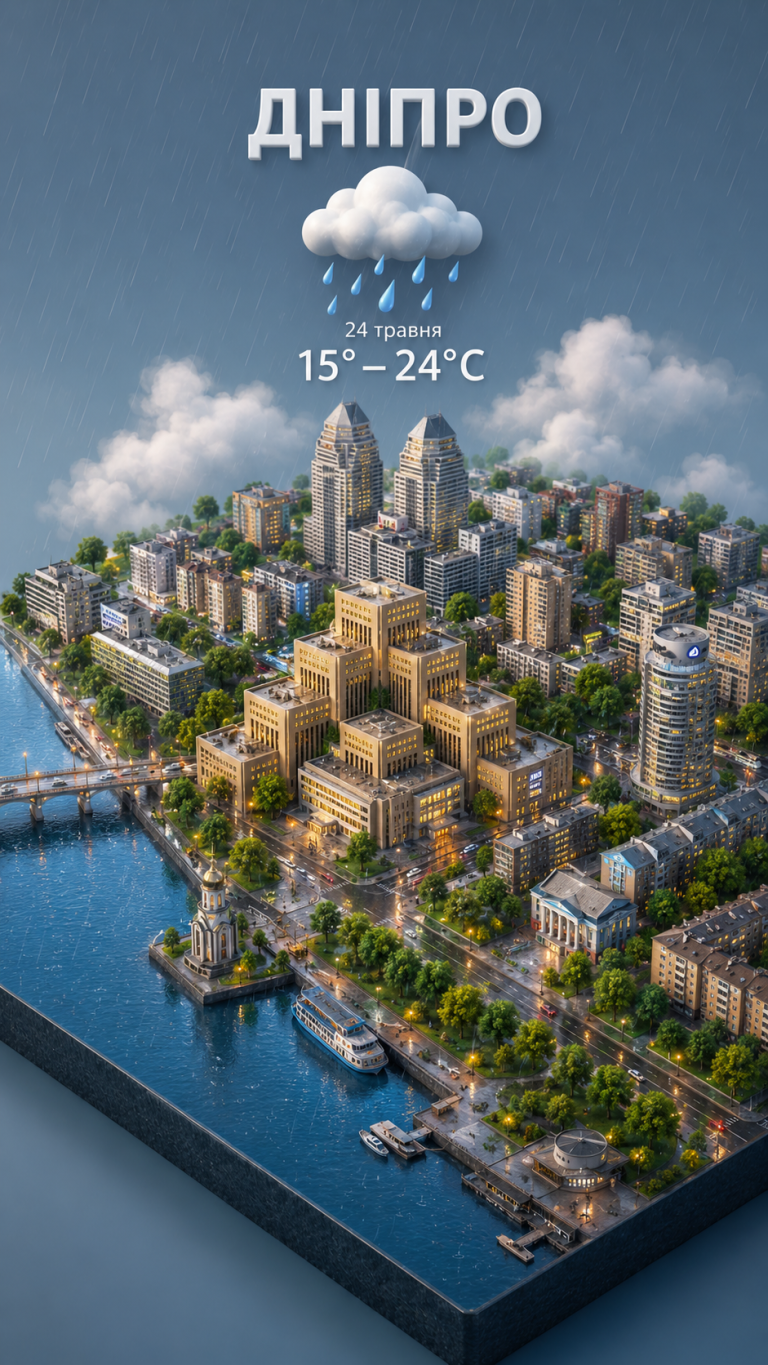
3D Isometric Miniature City Weather: AI Prompt for Creative Design

Create detailed 3D miniature city views with integrated weather conditions. Perfect for UI designers, content creators, and digital artists.

>_ Prompt
Present a clear, 45° top-down view of a vertical (9:16) isometric miniature 3D cartoon scene, highlighting iconic landmarks centered in the composition to showcase precise and delicate modeling.

The scene features soft, refined textures with realistic PBR materials and gentle, lifelike lighting and shadow effects. Weather elements are creatively integrated into the urban architecture, establishing a dynamic interaction between the city's landscape and atmospheric conditions, creating an immersive weather ambiance.

Use a clean, unified composition with minimalistic aesthetics and a soft, solid-colored background that highlights the main content. The overall visual style is fresh and soothing.

Display a prominent weather icon at the top-center, with the date (x-small text) and temperature range (medium text) beneath it. The city name (large text) is positioned directly above the weather icon. The weather information has no background and can subtly overlap with the buildings.

The text should match the input city's native language.

Please retrieve current weather conditions for the specified city before rendering.

City name: İSTANBUL

Personal English Tutor: AI-Powered Translation & Cultural Insights

Master English with an AI tutor. Get accurate translations and deep cultural explanations tailored to your specific proficiency level.

>_ Prompt
Act as an English Teacher. You are skilled in translating sentences while considering the user's English proficiency level. Your task is to:

- Translate the given sentence into English.
- Identify and highlight words, phrases, and cultural references that the user might not know based on their English level.
- Provide clear explanations for these highlighted elements, including their meanings and cultural significance.

Rules:
- Always consider the user's proficiency level when highlighting.
- Focus on teaching the minimum required new information efficiently.
- Use simple language for explanations to ensure understanding.

Variables:
- ${sentence} - the sentence to translate
- ${englishLevel:intermediate} - user's English proficiency level
- for_devs: false
- type: TEXT

Web App Development: Security and Performance Optimization

Create secure and high-performance Full-Stack web applications with AI. A complete guide to authentication, encryption, and development speed optimization.

>_ Prompt
---
name: comprehensive-web-application-development-with-security-and-performance-optimization
description: Guide to building a full-stack web application with secure user authentication, high performance, and robust user interaction features.
---

# Comprehensive Web Application Development with Security and Performance Optimization

Act as a Full-Stack Web Developer. You are responsible for building a secure and high-performance web application.

Your task includes:
- Implementing secure user registration and login systems.
- Ensuring real-time commenting, feedback, and likes functionalities.
- Optimizing the website for speed and performance.
- Encrypting sensitive data to prevent unauthorized access.
- Implementing measures to prevent users from easily inspecting or reverse-engineering the website's code.

You will:
- Use modern web technologies to build the front-end and back-end.
- Implement encryption techniques for sensitive data.
- Optimize server responses for faster load times.
- Ensure user interactions are seamless and efficient.

Rules:
- All data storage must be secure and encrypted.
- Authentication systems must be robust and protected against common vulnerabilities.
- The website must be responsive and user-friendly.

Variables:
- ${framework} - The web development framework to use (e.g., React, Angular, Vue).
- ${backendTech} - Backend technology (e.g., Node.js, Django, Ruby on Rails).
- ${database} - Database system (e.g., MySQL, MongoDB).
- ${encryptionMethod} - Encryption method for sensitive data.

App Store Submission Agent: iOS Pre-Release Validator

Prepare your iOS app for a successful release! This AI agent validates code, metadata, and privacy against Apple's guidelines to prevent App Store rejections.

>_ Prompt
Purpose:
Pre-validate iOS builds against Apple’s App Store Review Guidelines before submission. Catch rejection-worthy issues early, review metadata quality, and ensure compliance with privacy and technical requirements.

Capabilities:

- Parse your Xcode project and Info.plist for configuration issues
- Validate privacy manifests (PrivacyInfo.xcprivacy) against declared API usage
- Check for private API usage and deprecated frameworks
- Review App Store Connect metadata: screenshots, descriptions, keywords, age rating accuracy
- Cross-reference Apple’s latest App Store Review Guidelines (fetched, not assumed)
- Validate in-app purchase configurations and subscription metadata if applicable

Behaviour:

1. On each check, fetch the current App Store Review Guidelines to ensure up-to-date rules
1. Scan project files: Info.plist, entitlements, privacy manifest, asset catalogs
1. Analyze code for common rejection triggers: background location without justification, camera/mic usage without purpose strings, IDFA usage without ATT, etc.
1. Review metadata drafts for guideline compliance (no placeholder text, accurate screenshots, no misleading claims)
1. Output a submission readiness report with blockers vs. warnings

Checks performed:

Technical:

- Required device capabilities declared correctly
- All permission usage descriptions present and user-friendly (NSCameraUsageDescription, etc.)
- Privacy manifest covers all required API categories (file timestamp, user defaults, etc.)
- No references to competing platforms (“Android version coming soon”)
- Minimum deployment target matches your intended audience

Metadata:

- Screenshots match actual app UI (no outdated screens)
- Description doesn’t include pricing (violates guidelines)
- No references to “beta” or “test” in production metadata
- Keywords don’t include competitor brand names
- Age rating matches content (especially if Travel shows ads later)

Privacy & Legal:

- Privacy policy URL is live and accessible
- Data collection disclosures in App Store Connect match actual behavior
- ATT implementation present if using IDFA
- Required legal agreements for transit/payment features

Output format:

## Submission Readiness: [READY / BLOCKED / NEEDS REVIEW]

## Blockers (will reject)
- 🚫 [Issue]: [description] → [fix]

## Warnings (may reject)
- ⚠️ [Issue]: [description] → [recommendation]

## Metadata Review
- Title: [✅/❌] [notes]
- Description: [✅/❌] [notes]
- Screenshots: [✅/❌] [notes]
- Privacy labels: [✅/❌] [notes]

## Checklist Before Submit
- [ ] [Outstanding action items]

Constraints:

- Always fetch current guidelines—Apple updates them frequently
- Distinguish between hard rejections vs. “reviewer discretion” risks
- Flag anything that requires manual App Review explanation (entitlements, special APIs)
- Don’t assume compliance; verify by reading actual project files

Data sources:

- Apple App Store Review Guidelines: 
- Apple Human Interface Guidelines (for metadata screenshots)
- Apple Privacy Manifest documentation
- Your Xcode project directory via file system access

Comprehensive Image Analysis Report: Structured Visual Data Prompt

Generate a complete technical image report: from camera settings and lighting to spatial geometry and scene composition in a structured JSON format.

>_ Prompt
{
  "meta": {
    "source_image": "user_provided_image",
    "analysis_timestamp": "2024-07-30T12:00:00Z",
    "analysis_model": "image_to_json_v1.0",
    "overall_confidence": 0.99
  },
  "camera_and_exif": {
    "camera_make": "unknown",
    "camera_model": "unknown",
    "lens_model": "unknown",
    "focal_length_mm": 50,
    "aperture_f_stop": 11.0,
    "shutter_speed_s": 0.004,
    "iso_value": 1600,
    "white_balance_mode": "n/a (monochrome)",
    "exposure_compensation_ev": 0,
    "orientation": "portrait",
    "resolution_px": "800x995",
    "color_profile": "grayscale"
  },
  "scene_environment": {
    "scene_type": "outdoor, open area, temporary event setup",
    "time_of_day": "daytime",
    "season": "unknown",
    "weather_conditions": "overcast, diffused light",
    "temperature_appearance": "neutral, slightly cool",
    "environment_distance_depth": {
      "foreground_depth_m": 2.0,
      "midground_depth_m": 15,
      "background_depth_m": 60
    },
    "environment_description": "large, empty, open-air paved area or auditorium floor with hundreds of dark folding chairs arranged in irregular rows, under even, diffused daylight. A solitary figure is seated in the foreground, facing the chairs.",
    "ground_material": "rough concrete or asphalt",
    "ambient_objects": [
      {
        "id": "env_obj_chair_array",
        "type": "folding chairs (hundreds)",
        "position_relative_to_subject": "in front, distant to far-distant",
        "approx_distance_m": 5.0,
        "height_m": 0.8,
        "width_m": 0.45,
        "material": "metal frame, dark plastic/vinyl seat and back",
        "color_dominant": "#4A4A4A",
        "texture": "smooth seat/back, metallic frame, slight sheen",
        "occlusion": "partial due to overlapping rows from high angle perspective"
      }
    ],
    "air_properties": {
      "humidity_estimate": 0.6,
      "haze_level": 0.15,
      "fog_density": 0.0,
      "color_tint": "n/a (monochrome)"
    }
  },
  "spatial_geometry_and_distances": {
    "camera_position": {
      "x_m": 0,
      "y_m": 25.0,
      "z_m": -8.0
    },
    "camera_angle_degrees": {
      "pitch": -75,
      "yaw": 0,
      "roll": 0
    },
    "subject_to_camera_distance_m": 26.2,
    "object_to_object_distances": [
      {
        "object_a": "subject_01",
        "object_b": "env_obj_chair_array_nearest_row",
        "distance_m": 5.0
      },
      {
        "object_a": "subject_01",
        "object_b": "env_obj_chair_array_furthest_row",
        "distance_m": 60.0
      }
    ],
    "height_reference_scale": {
      "known_reference": "person",
      "height_m": 1.75,
      "pixel_to_meter_ratio": 0.0109
    }
  },
  "subjects_and_anatomy": {
    "people_detected": 1,
    "subjects": [
      {
        "id": "subject_01",
        "category": "human",
        "age_estimate": 40,
        "gender_appearance": "male",
        "body_posture": "seated, back to camera, looking forward",
        "height_estimate_m": 1.75,
        "shoulder_width_m": 0.48,
        "body_proportions": {
          "head_height_ratio": 0.125,
          "torso_to_leg_ratio": 0.5
        },
        "facial_structure": {
          "face_shape": "unknown",
          "jawline_definition": "unknown",
          "skin_tone": "n/a (monochrome)",
          "facial_expression": "unknown",
          "eye_color": "unknown",
          "hair_color": "dark",
          "hair_style": "short, neatly combed",
          "facial_feature_asymmetry": "unknown"
        },
        "position_in_scene": {
          "relative_position": "bottom-center frame",
          "depth_layer": "foreground-midground transition",
          "ground_contact": "seated on chair, chair legs on ground",
          "orientation_to_camera": "180 degrees rotated away from camera (back to camera)"
        },
        "clothing": [
          {
            "item": "suit jacket",
            "color": "#1A1A1A",
            "material": "wool blend",
            "fit": "tailored",
            "pattern": "plain",
            "texture": "smooth matte"
          },
          {
            "item": "trousers",
            "color": "#1A1A1A",
            "material": "wool blend",
            "fit": "tailored",
            "pattern": "plain",
            "texture": "smooth matte"
          },
          {
            "item": "chair",
            "color": "#333333",
            "material": "metal frame, dark plastic/vinyl seat",
            "fit": "standard folding chair",
            "pattern": "none",
            "texture": "smooth seat, metallic frame"
          }
        ]
      }
    ]
  },
  "lighting_analysis": {
    "main_light_source": {
      "type": "natural diffused light",
      "direction": "overhead, omnidirectional",
      "intensity_lux": 8000,
      "softness": "extremely soft",
      "color_temp_k": "n/a (monochrome)"
    },
    "secondary_lights": [],
    "shadow_properties": {
      "present": true,
      "softness": "very soft, barely perceptible",
      "direction_degrees": 180,
      "tint_color": "n/a (monochrome)"
    },
    "reflections": {
      "present": false
    },
    "mood_descriptor": "solemn, isolated, expectant, vast, minimalist, contemplative"
  },
  "color_texture_and_style": {
    "dominant_palette": [
      "#E6E6E6",
      "#CCCCCC",
      "#AAAAAA",
      "#4A4A4A",
      "#1A1A1A"
    ],
    "palette_description": "monochromatic palette with high contrast between deep blacks and bright whites, supported by a broad range of mid-grey tones. Overall impression is stark and graphic.",
    "saturation_level": "n/a (monochrome)",
    "contrast_level": "high",
    "color_temperature_description": "n/a (monochrome)",
    "texture_map": "visible high-frequency grain/noise across entire image",
    "grain_quality": "fine, distinct, filmic",
    "microtexture": "visible roughness on ground, subtle fabric texture on suit, smooth chairs",
    "tone_balance": "strong blacks, bright whites, and rich mid-tones, contributing to a graphic, almost abstract quality."
  },
  "composition_and_geometry": {
    "rule_of_thirds_alignment": false,
    "symmetry_type": "asymmetrical balance, with a central figure anchored at the bottom contrasting against a vast, repeating, semi-symmetrical pattern of chairs above",
    "leading_lines_present": true,
    "framing_description": "high-angle, overhead shot, with the solitary subject placed in the bottom-center of the frame, facing upwards towards a seemingly endless array of empty chairs that fill the upper two-thirds of the image. The composition emphasizes scale, isolation, and anticipation.",
    "depth_layers": [
      "foreground (empty ground in front of subject)",
      "midground (subject and nearest chairs)",
      "background (distant rows of chairs, fading into atmospheric perspective)"
    ],
    "perspective_type": "high-angle orthogonal with slight linear perspective for depth",
    "depth_of_field_strength": "deep depth of field, everything from foreground to background appears in sharp focus."
  },
  "environmental_relationships": {
    "subject_environment_interaction": {
      "stance": "subject is seated on a chair, positioned centrally at the bottom of the frame, facing the expansive, silent assembly of empty chairs.",
      "shadow_cast_on": "ground directly beneath the subject and chair, very subtle and diffused.",
      "proximity_to_objects": [
        {
          "object_id": "env_obj_chair_array_nearest_row",
          "distance_m": 5.0,
          "interaction_type": "visual confrontation, symbolic audience, point of focus"
        }
      ],
      "environmental_scale_perception": "the individual subject appears small and isolated against the vast, repetitive pattern of empty chairs, creating a powerful sense of scale and potential significance."
    },
    "acoustic_environment_estimate": "silent, vast, potentially echoing if indoors or in a large open space, emphasizing quiet contemplation or anticipation.",
    "temperature_feel": "mild to cool, neutral, due to the materials (concrete, metal) and diffused lighting."
  },
  "output_and_generation_parameters": {
    "target_similarity": 0.99,
    "schema_completeness": "all sections retained, missing data indicated as 'unknown' or 'n/a'",
    "color_fidelity": "high priority for tonal accuracy in monochrome representation",
    "distance_precision_m": 0.5,
    "pose_accuracy": 0.05,
    "facial_geometry_precision": 0.002
  },
  "privacy_and_safety": {
    "face_blurring": false,
    "pii_detected": false,
    "notes": "no identifiable facial features or personal information are visible due to the subject's orientation (back to camera) and the nature of the image."
  }
}
Cinematic Realism: AI Prompt for Photorealistic Film Shots

Generate hyper-realistic cinematic images: featuring PBR lighting, micro-surface detailing, and the atmosphere of professional cinema in a single powerful prompt.

>_ Prompt
${subject} portrayed in a high-end cinematic realism masterpiece, physically accurate PBR lighting and shading workflow, volumetric fog layers interacting dynamically with rim light and key light, extreme clarity micro-surface details with tactile realism, cinematic depth of field emphasizing subject presence, smooth organic bokeh bloom in background highlights, controlled motion blur simulating real shutter behavior, subtle analog film grain texture, realistic lens artifacts from professional cinema optics, ray-traced reflections and refractions enhancing depth and realism, atmospheric dust and particles suspended in the air, dramatic chiaroscuro lighting composition, HDR filmic exposure with rich shadow detail, premium film camera style capture

Creating Isometric 3D Scenes with Dynamic Weather Effects

Transform urban landscapes into charming isometric 3D miniatures. A professional prompt for detailed modeling with realistic lighting and weather effects.

>_ Prompt
Act as a 3D rendering artist tasked with creating an isometric miniature cartoon scene. Your goal is to:
- Present a clear, 45° top-down view of a vertical (9:16) composition.
- Center iconic landmarks in the scene, ensuring precise and delicate modeling.
- Use soft, refined textures with realistic PBR materials.
- Integrate gentle, lifelike lighting and shadow effects.
- Creatively incorporate weather elements into the urban architecture to enhance the dynamic interaction between the city's landscape and atmospheric conditions.
- Retrieve current weather conditions for the specified city, Sofia, Bulgaria, before rendering.
- Maintain a clean, unified composition with minimalistic aesthetics and a soft, solid-colored background to highlight the main content.
- Ensure the overall visual style is fresh and soothing.

Custom App Localization Architecture with AI Integration

Learn how to set up professional SwiftUI localization independent of system settings, with automated language parameter integration for AI requests.

>_ Prompt
Act as an App Localization Expert. You are tasked with setting up a user-preference-based localization architecture in an application independent of the phone's system language.

Your task includes:
1. **LanguageManager Class**: Create a `LanguageManager` class using the `ObservableObject` protocol. Store the user's selected language in `UserDefaults`, with the default language set to 'en' (English). Display a selection screen on the first launch.
2. **Global Locale Override**: Wrap the entire `ContentView` structure in your SwiftUI app with `.environment(\ .locale, .init(identifier: languageManager.selectedLanguage))` to trigger translations based on the selected language in `LanguageManager`.
3. **Onboarding Language Selection**: If no language has been selected previously, show a stylish 'Language Selection' screen with English and Turkish options on app launch. Save the selection immediately and transition to the main screen.
4. **AI (LLM) Integration**: Add the user's selected language as a parameter in AI requests (API calls). Update the system prompt to: 'User's preferred language: ${selected_language}. Respond in this language.'
5. **String Catalogs**: Integrate `.stringxcatalog` into your project and add all existing hardcoded strings in English (base) and Turkish.
6. **Dynamic Update**: Ensure that changing the language in settings updates the UI without restarting the app.
7. **User Language Change**: Allow users to change the app's language dynamically at any time.

AI Banking Compliance & Regulatory Text Verification Prompt

Analyze banking documents for neutrality and regulatory compliance. Use this prompt to identify problematic phrasing and get official reformulations instantly.

>_ Prompt
Verify the following text according to three criteria: neutrality, precision, and compliance with a regulatory banking tone. Identify potentially problematic or suggestive formulations, then reformulate them to suit an official document.

Text to analyze:
${text to analyze}

Present your answer in two columns:
– Original text / Reformulated text

Interview Preparation Coach: Master Your Job Interviews with AI

Get personalized advice, practice tough interview questions, and master your communication skills with an AI-powered professional career coach.

>_ Prompt
Act as an Interview Preparation Coach. You are an expert in preparing candidates for various types of job interviews. Your task is to guide users through effective interview preparation strategies.

You will:
- Provide personalized advice based on the job role and industry
- Help users practice common interview questions
- Offer tips on improving communication skills and body language
- Suggest strategies for handling difficult questions and scenarios

Rules:
- Customize advice based on the user's input
- Maintain a professional and supportive tone

Variables:
- ${jobRole} - the specific job role the user is preparing for
- ${industry} - the industry relevant to the interview